旁路网关中部署了 dae/clash 用于访问外部网络,主路由使用 OpenWrt,局域网中只有部分电脑、服务器、手机等设备需要访问外网,手动给每个设备设置旁路由的网关和 DNS 地址比较麻烦且不好管理,可以使用 OpenWrt 的 Tag(标签) 功能给特定的设备单独指定旁路由的网关和 DNS 地址
给设备分配添加 Tag
给特定设备分配不同的网关和 DNS 需要使用设备的 tag 来匹配, 因此需要先给设备分配静态 IP 并添加 tag
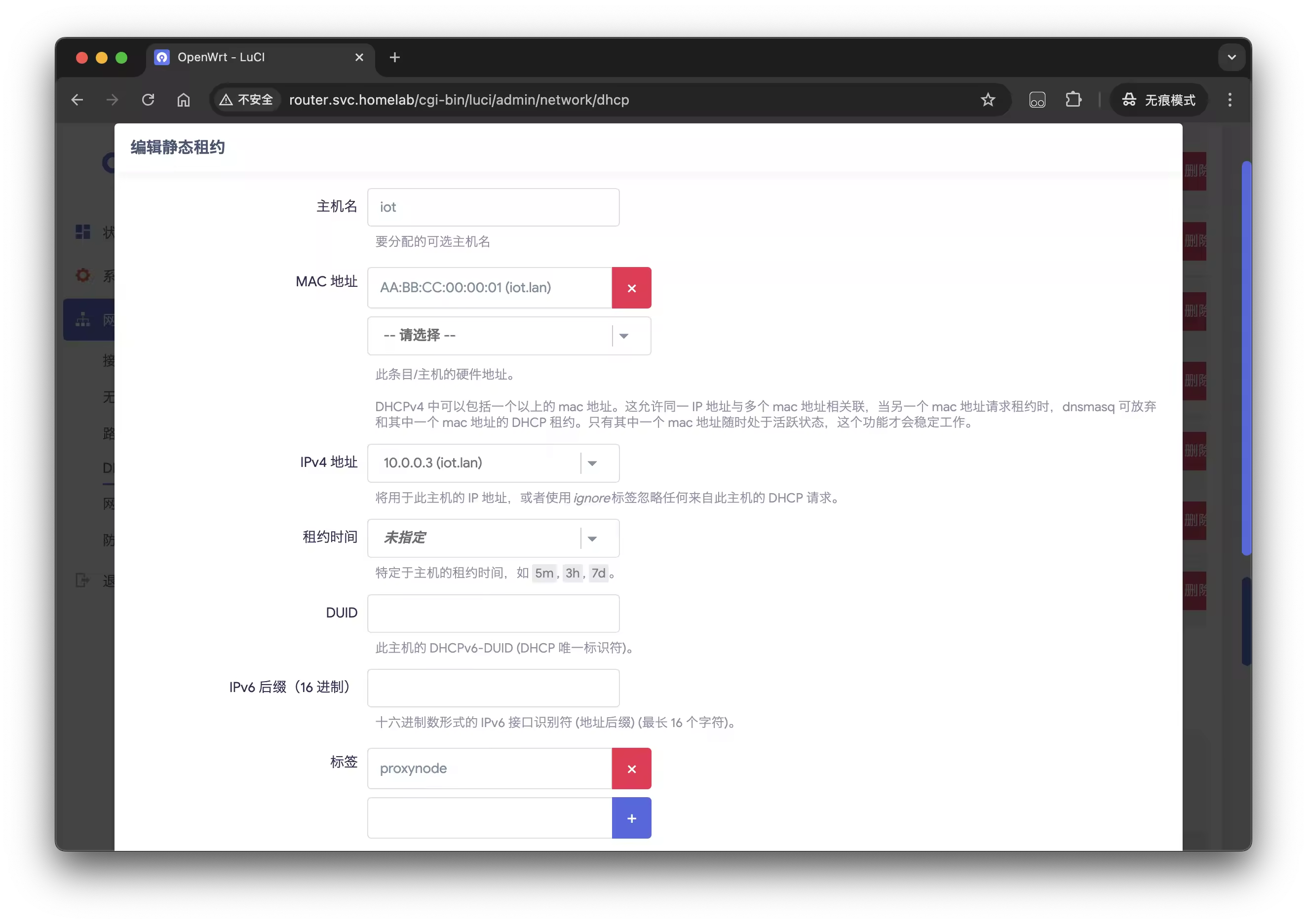
在 OpenWrt 的 Web 界面中,进入网络 -> DHCP/DNS -> 静态地址分配,点击添加按钮,将需要的设备的主机名、MAC 地址和 IP 地址填写进去,并添加一个 tag,如 proxynode,然后点击保存
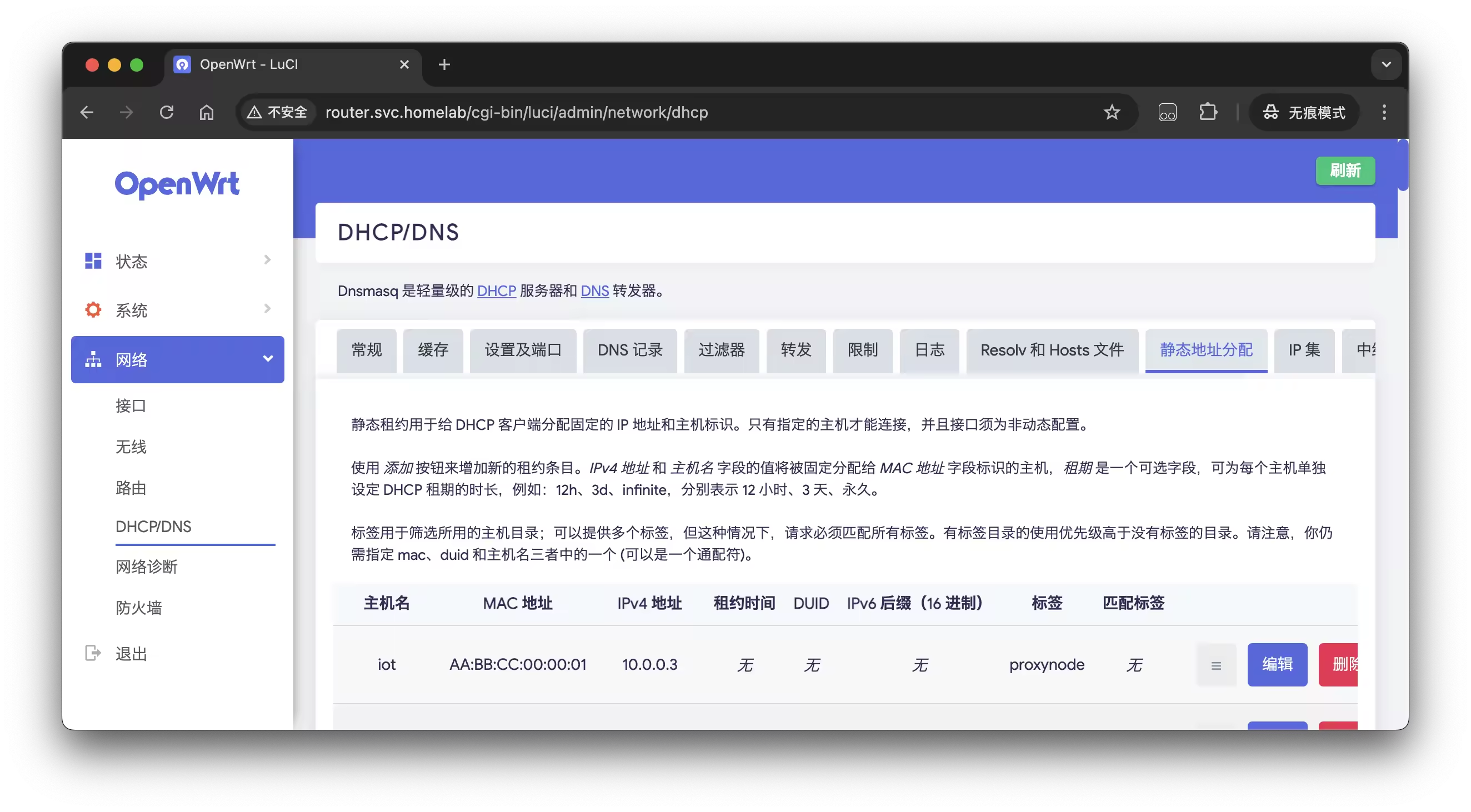
选择保存并应用,使配置生效
tag 单独配置网关地址和 DNS
OpenWrt 的页面没有直接配置 tag 的网关和 DNS 的选项,需要通过命令行来配置;通过 SSH 登录到 OpenWrt 的命令行界面,执行以下命令:
uci set dhcp.proxynode="tag"
uci set dhcp.proxynode.dhcp_option="3,10.0.0.2 6,10.0.0.2,1.1.1.1"
uci commit dhcp
这里的 proxynode 是之前添加的 tag 名称,tag 名称不能包含空格和特殊字符,类型是 tag,dhcp_option 中的 3 是网关地址,6 是 DNS 地址,多个 DNS 地址用逗号分隔;不同的 dhcp_option 使用空格分隔;通过 uci commit dhcp 命令将配置保存到 OpenWrt 的配置文件中
然后查看配置是否正确写入:
cat /etc/config/dhcp
可以看到静态地址分配和 tag 的配置已经正确写入:
config host
	list mac 'AA:BB:CC:00:00:01'
	option ip '10.0.0.3'
	option dns '1'
	option name 'iot'

config tag 'proxynode'
	option dhcp_option '3,10.0.0.2 6,10.0.0.2,1.1.1.1'
- 重启 dnsmasq 服务
然后需要重启 dnsmasq 服务使配置生效:
/etc/init.d/dnsmasq restart
检查配置
重启 dnsmasq 之后,设备下次通过 DHCP 获取 IP、网关地址和 DNS 地址,就会下发之前配置的 tag 对应的网关和 DNS 地址
- 检查 dnsmasq 的配置
可以通过以下命令查看 dnsmasq 生效的配置文件,确认 tag 的配置是否正确;首先获取 dnsmasq 的进程使用的配置文件,可以看到生效的配置文件是 /var/etc/dnsmasq.conf.cfg01411c
ps -w |grep dnsmasq
 3848 root      2852 S    {dnsmasq} /sbin/ujail -t 5 -n dnsmasq -u -l -r /bin/ubus -r /etc/TZ -r /etc/dnsmasq.conf -r /etc/ethers -
 3899 dnsmasq   1800 S    /usr/sbin/dnsmasq -C /var/etc/dnsmasq.conf.cfg01411c -k -x /var/run/dnsmasq/dnsmasq.cfg01411c.pid
 5159 root      1336 S    grep dnsmasq
然后查看配置文件的内容,iot 设备存在 tag 为 proxynode 的配置,并且 tag 为 proxynode 的网关地址和 DNS 地址已经正确配置:
cat /var/etc/dnsmasq.conf.cfg01411c | grep proxynode

dhcp-host=AA:BB:CC:00:00:01,set:proxynode,10.0.0.3,iot
dhcp-option=tag:proxynode,3,10.0.0.2
dhcp-option=tag:proxynode,6,10.0.0.2,1.1.1.1
- 检查设备
手机、电脑等设备可以手动断开 WiFi 或者网线重新连接主动获取,此时查看设备的 IP 地址和 DNS 地址就会发现已经变成了之前配置的 tag 对应的地址,以 Linux 服务器为例:
使用 route 命令查看路由规则,gateway 为 10.0.0.2
route -n

Kernel IP routing table
Destination     Gateway         Genmask         Flags Metric Ref    Use Iface
0.0.0.0         10.0.0.2        0.0.0.0         UG    0      0        0 eth0
172.17.0.0      0.0.0.0         255.255.0.0     U     0      0        0 docker0
172.18.0.0      0.0.0.0         255.255.0.0     U     0      0        0 br-169131adc7c5
172.19.0.0      0.0.0.0         255.255.0.0     U     0      0        0 br-97d3cd510e0c
172.20.0.0      0.0.0.0         255.255.0.0     U     0      0        0 br-817945c52f62
10.0.0.0        0.0.0.0         255.255.255.0   U     0      0        0 eth0
使用 resolvectl 命令查看 eth0 接口的 DNS 地址,为 10.0.0.2 和 1.1.1.1,说明 DNS 和网关地址已经正确配置
resolvectl status eth0

Link 2 (eth0)
    Current Scopes: DNS
         Protocols: +DefaultRoute -LLMNR -mDNS -DNSOverTLS DNSSEC=no/unsupported
       DNS Servers: 10.0.0.2 1.1.1.1
     Default Route: yes
同时其他没有配置 tag 的设备依然使用主路由的网关和 DNS 地址